
Applicable To
- UD-3900, UD-3900-EU, UD-3900C4, UD-3900PDZ, UD-3900Z, UD-6950PDH, UD-6950PDZ, UD-6950Z, UD-ULTC4K, UD-ULTCDL
If headphones or speakers are connected to the analog audio output of a Plugable DisplayLink-based docking station but no sound is heard, Windows may be sending audio to a different playback device. You can usually resolve this by selecting Plugable Audio as the Windows audio output.
Troubleshooting Steps
- Confirm that your headphones or speakers are connected to the analog audio output jack on the Plugable docking station.
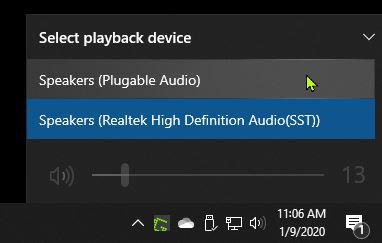
- Select the speaker icon in the Windows taskbar near the date and time.
- Select the arrow next to the volume control to display the available audio output devices.
- Select Plugable Audio from the list of available audio output devices.
Expected Result
Audio should now play through the headphones or speakers connected to the analog audio output jack on the Plugable DisplayLink-based docking station.
If the Issue Persists
If Plugable Audio does not appear as an available output device, or there is still no sound after selecting it, see our guide for changing the default audio device:
https://kb.plugable.com/question/379342
If the audio device is still missing or the docking station is not functioning as expected, follow our DisplayLink troubleshooting and clean installation process:
https://kb.plugable.com/373346
If the issue continues after completing these steps, contact Plugable Support at support@plugable.com.
