
What Are the Different Types of USB Connectors?
The most common USB connectors are USB-A, USB-B, USB Mini-B, USB Micro-B, and USB-C. USB-C is also the only connector used by USB4, Thunderbolt™ 3, Thunderbolt™ 4, and Thunderbolt™ 5. Each type differs in size, supported data rates, and whether it can carry video and power.
How to Identify Each Type of USB Connector
USB-A

pietz, CC BY-SA 3.0 , via Wikimedia Commons
This is the standard USB connection that most computers offered prior to the introduction of USB Type-C (USB-C). Even after the introduction of USB Type-C, this is still quite common.
It can provide data transfer rates up to the USB 3.1 Gen 2 (10 gbps) specification depending on the host and device, but does not directly support video in the way that USB-C Alternate Mode does. This limitation makes DisplayLink USB graphics adapters and docking stations ideal on systems that do not have USB-C, or in instances where more displays are needed beyond available video outputs of a PC.
USB-A ports do not support USB4, Thunderbolt 3, Thunderbolt 4, or Thunderbolt 5, as those standards require a USB-C connection.
USB-B

Fred the Oyster, CC BY-SA 4.0 , via Wikimedia Commons

IngenieroLoco, CC BY-SA 4.0, via Wikimedia Commons
This type of connection comes in a couple different styles depending on whether USB 3.0 and higher transfer rates are supported (bottom graphic). Usually this type of connection is used to plug into USB devices that do not have a fixed cable connected, such as USB docking stations, USB hubs, printers, and others.
USB Mini-B
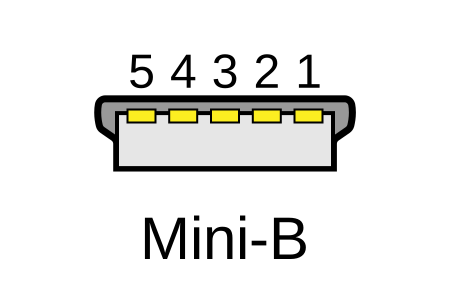
Fred the Oyster, CC BY-SA 4.0 , via Wikimedia Commons
One of the first connectors for charging a smartphone, wireless game controller (such as the Sixaxis and DualShock 3), and other small devices such as external hard drives. Not commonly used today, but is still used in some cases. Most devices using USB Mini B are using USB 2.0, though a USB 3.0 variant does exist. This specification also added USB On-The-Go (OTG) functionality, though it is more commonly implemented with Micro USB.
USB Micro-B

Fred the Oyster, CC BY-SA 4.0, via Wikimedia Commons
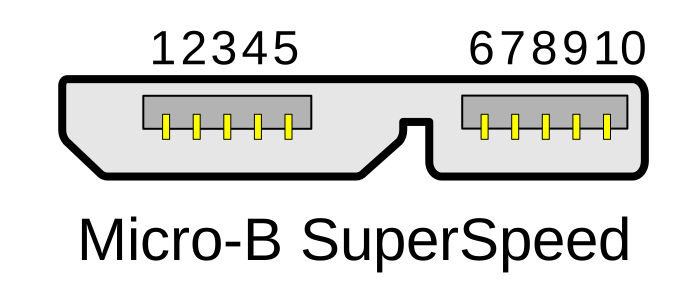
IngenieroLoco, CC BY-SA 4.0 , via Wikimedia Commons
A smaller connector that serves many of the same uses as the Mini B connector, with added optional features such as Mobile High-Definition Link (MHL) to allow devices like smartphones to output video to larger displays without requiring a dedicated port for video output.
The larger variant of USB-B is most commonly used for external hard drives for higher 5Gbps transfer rates.
USB-C, USB4, Thunderbolt™ 3, Thunderbolt™ 4, and Thunderbolt™ 5

Chindi.ap, CC BY-SA 4.0 , via Wikimedia Commons
The most recent USB connection, USB Type-C (USB-C), represents a major change in what USB can do. The connector is smaller, can be connected in two orientations, is able to carry substantially more power and data, and can directly carry video signals of multiple types (HDMI, DisplayPort, etc.) Intel has also adapted the USB-C connector for use with Thunderbolt 3, Thunderbolt 4, and Thunderbolt 5.
USB4 is the newest USB standard and uses the USB-C connector exclusively. USB4 supports data transfer rates up to 40 Gbps, and USB4 Version 2.0 raises this to 80 Gbps, or up to 120 Gbps in one direction for high-bandwidth display use. Thunderbolt 3 and Thunderbolt 4 support up to 40 Gbps. Thunderbolt 5 is built on USB4 Version 2.0 and supports 80 Gbps in both directions, up to 120 Gbps with Bandwidth Boost for multiple high-resolution displays.
It is important to note that while all USB4, Thunderbolt 3, Thunderbolt 4, and Thunderbolt 5 connections are USB-C, not all USB-C connections support USB4 or can be used with Thunderbolt devices. Check your computer's specifications or look for the Thunderbolt or USB4 logo next to the port to confirm what it supports.
More details regarding physical USB connections can be found on Wikipedia . The graphics depicted here are adapted from Wikimedia Commons by various artists under the Creative Commons Attribution-Share Alike 3.0 Unported license.
Applicable To
- Plugable USB Docking Stations
- Plugable USB Hubs
- Plugable Thunderbolt Cables
- Plugable USB Cables


