
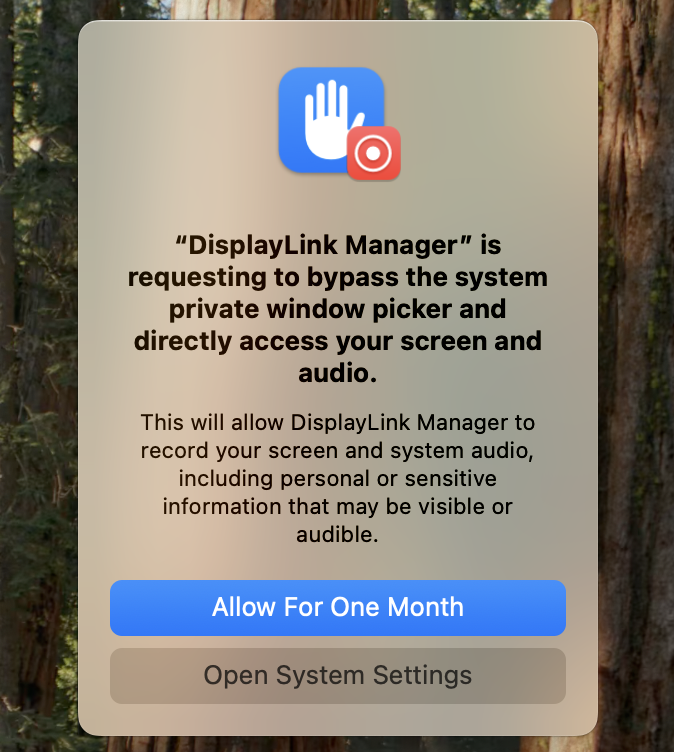
The 'Allow For One Month' prompt is a macOS 15 Sequoia security reminder for applications that access screen content. DisplayLink Manager requires this access to generate the image shown on monitors connected through a DisplayLink dock or USB graphics adapter.
Applicable To
Mac computers running macOS 15 Sequoia with DisplayLink Manager and a Plugable DisplayLink-based dock or USB graphics adapter.
What Should I Do?
If this macOS prompt appears while you are using a DisplayLink product, select 'Allow For One Month'. If macOS presents the reminder again later, allow access again to continue using your DisplayLink-connected displays.
Example of the macOS 15 prompt:
Why Is This Permission Needed?
DisplayLink Manager needs macOS screen access to send the desktop image to DisplayLink-connected displays. DisplayLink Manager does not record or store screen content as part of this display function. The permission prompt comes from macOS.
Need Assistance?
If your DisplayLink-connected displays do not return after allowing access, email support@plugable.com with your Mac model, macOS version, Plugable product model, and a screenshot of the prompt or permission setting.
