
Why Won't My Plugable Bluetooth Adapter Reconnect After My PC Wakes From Sleep?
Applicable To
- Plugable USB-BT4LE Bluetooth 4.0 Adapter
- Plugable USB-BT5 Bluetooth 5.0 Adapter
- Windows 10, 11
The Plugable Bluetooth adapter is a radio that Windows uses to communicate over Bluetooth. Windows and your Bluetooth device are responsible for reestablishing connections. On some computers, the USB controllers do not always wake, so the adapter is not ready to reconnect your devices. Changing a few Windows power settings usually resolves this.
Troubleshooting Steps
- Search for Control Panel in the Start menu and open it.
- Open Power Options.
- Select Change plan settings next to your active power plan.
- Select Change advanced power settings.
- Expand USB settings > USB selective suspend setting, and set it to Disabled.
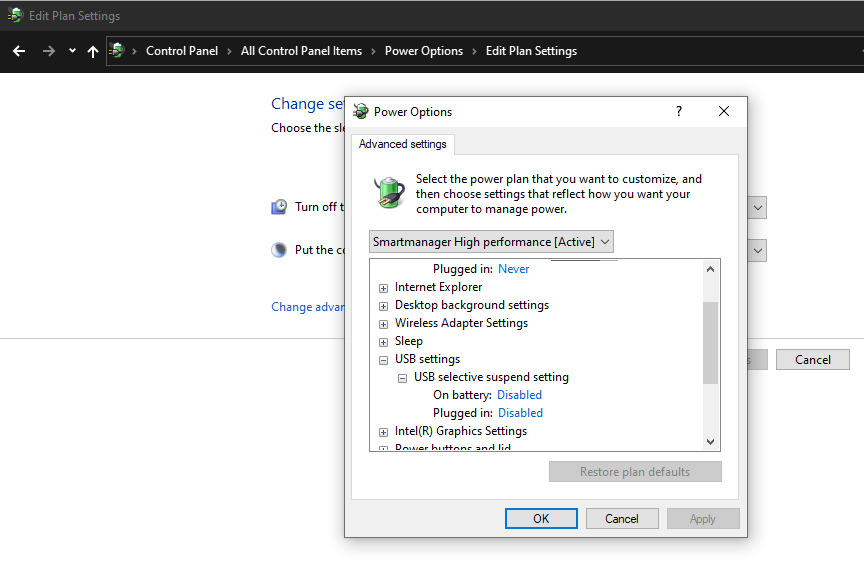
- Select Apply, then OK.
- Right-click the Start menu button and choose Device Manager.
- Expand Bluetoothand double-click your Plugable adapter.
- The USB-BT4LE appears as Broadcom BCM20702 Bluetooth 4.0 USB Device.
- The USB-BT5 appears as Generic Bluetooth Adapter or with the latest drivers installed the Plugable USB-BT5 Bluetooth Adapter
- Select the Power Management tab. This tab may not be available on all systems.
- Uncheck Allow the computer to turn off this device to save power, then select OK.
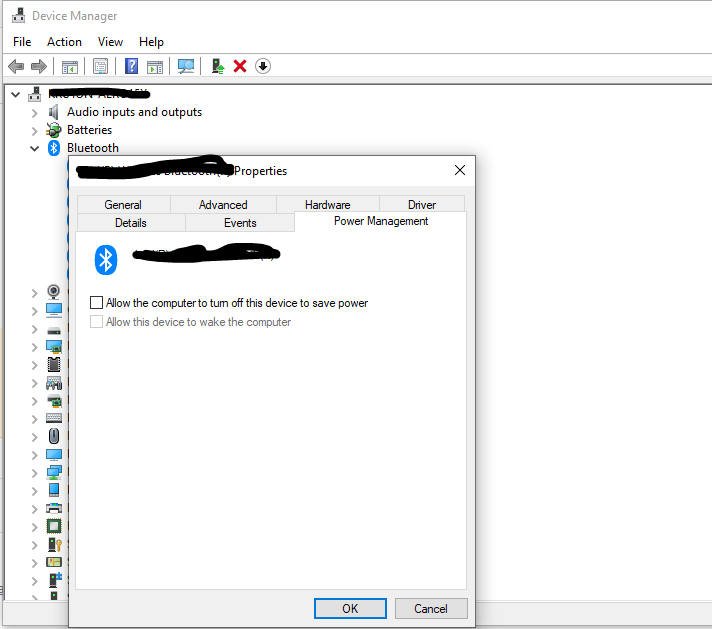
- Expand Universal Serial Bus controllers and repeat steps 9 and 10 for each USB Root Hub listed.
- Restart your computer to apply the changes.
Expected Result
After your computer wakes from sleep, your Bluetooth devices reconnect automatically through the Plugable adapter without needing to be unplugged, re-paired, or restarted.
If the Issue Persists
If your Bluetooth devices still do not reconnect after waking, please contact Plugable support at support@plugable.com.
