
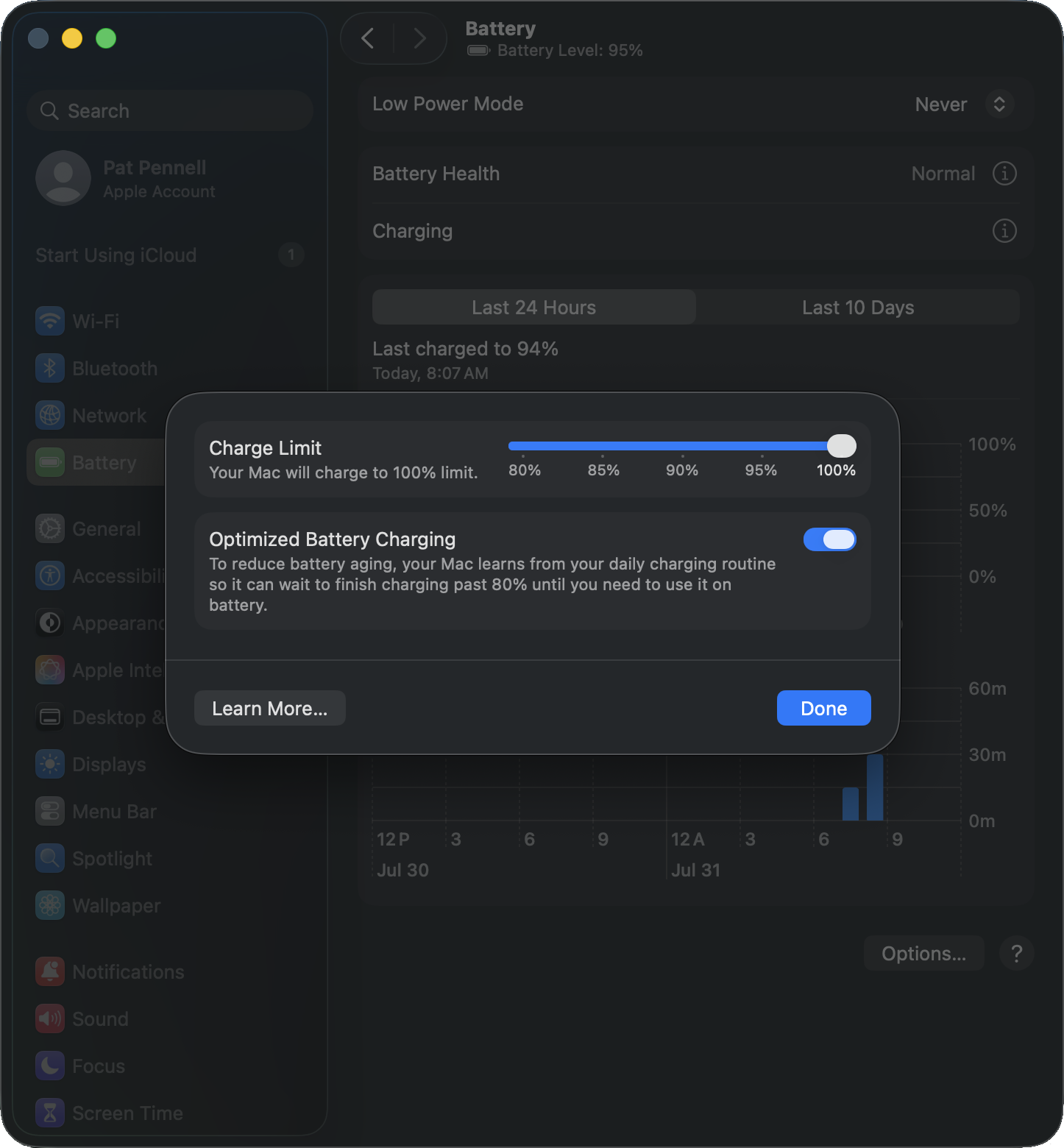
If you routinely discharge your MacBook battery and fully recharge the battery often, macOS may set a battery charge limit to 80% to "reduce battery aging". In most cases this is a good option to have, however if you need the battery to be fully charged this setting can be disabled.
Disable the battery charge limiter
- Select System Settings the Apple menu
- Select Battery from the left column in System Settings
- Select the Info button ("I" inside a circle) on the Charging line near the top of the right panel
- Toggle off the Optimize Battery Charging option
A bit more detail
Time
Lithium-Ion batteries used in modern notebook computers are significantly more reliable and predictable than previous battery technologies, however like all batteries they both degrade over time regardless of use.
All battery technologies will begin to degrade after production, when in storage, or in active use. When storing a Lithium-Ion battery normally it is recommended to partially discharge the battery to help minimize degradation in storage.
Cycles
Battery life spans are often described in discharge/charge cycles, by limiting the top-end charge (often limiting the charge to 80%) system manufacturers seek to reduce the degradation with each charge cycle. One method is to simply over-spec the battery and set the operating system's 100% threshold to 80% of the battery's maximum capacity, this has the added benefit that over time as the battery degrades the charge controller could allocate more of the top-end charge potential to shift the reported 100% capacity maintaining the same power capacity over a longer period of time. Apple doesn't seem to use this approach, instead using the full capacity of the battery and implementing the battery charge limiter to help maintain that full capacity.
Apple macOS has a battery health report in the System Settings > Battery panel there is an info button for Battery Health which shows the Battery Condition and Maximum Capacity.
Our recommendation
We recommend sticking with the system's default battery charge settings, unless you specifically need to charge the battery to 100%.
The default setting helps to maintain the battery lifespan of the system, however could cause reduced work time while on battery. Batteries are no longer a user serviceable component of MacBook or most modern notebook computers, increasing the cost of battery replacement in both time and labor fees compared to older systems where batteries could easily be removed with one or two locking latches/levers.
If you have any questions please feel free to contact us at support@plugable.com and we'll be happy to help!
